


Dzees Home
4.7382.00 Reviews
App Specs
- Version
- 2.0.10
- Updated On
- License
- Free
- Downloads
- 100,000+
- Developer
- yuanxi creation tech
- Categories
- Tools
- Platform
- Android
Screenshots
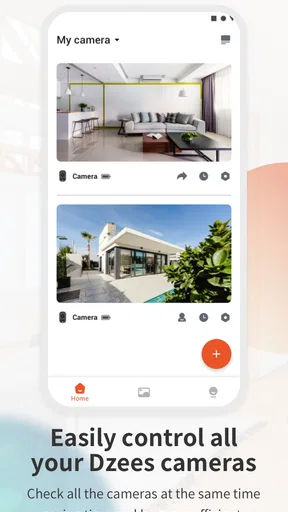
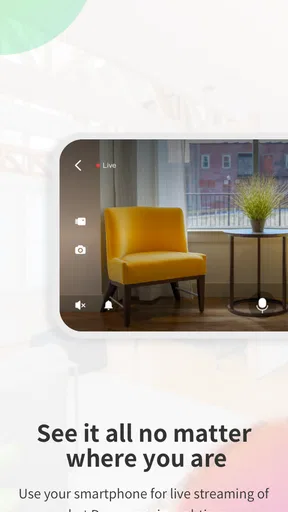
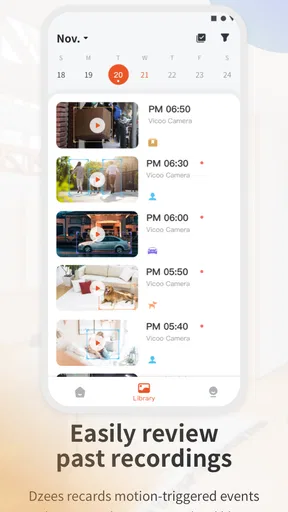
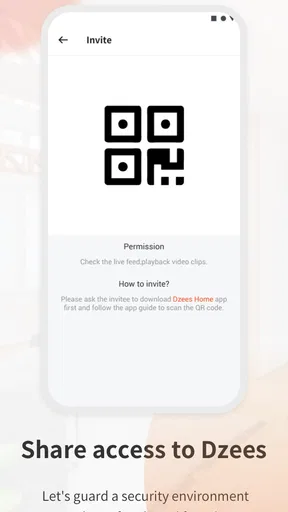
 Analysis by AppCompare
If you are looking for a single place to manage a compatible smart camera, Dzees Home is the kind of tool that makes sense to test before committing to a more complicated home-monitoring setup. I used it with the mindset of someone who wants quick access to a camera rather than a full security command center, and that distinction matters. The app is free to install, aimed at Everyone, and belongs to the Tools category, but its usefulness depends heavily on whether your camera belongs to the Dzees ecosystem.
My first impression was that this is a focused companion app rather than an all-purpose smart-home platform. Its store summary also refers to “Smart camera” and “Dzeeshome,” which gives a good clue about its role: the app exists to connect your daily camera checks with the hardware it supports. It is developed by yuanxi creation tech, has a 4.7 average from around 3.3 thousand ratings, and has passed 100 thousand installs. Those figures suggest a real user base, while still leaving room for individual experiences to vary depending on the camera model, network, and phone.
What I would check before choosing it
Before I settle on a camera companion, I would check whether it fits the way I expect to use the camera, not just whether setup seems straightforward. In particular, I would consider who else needs access and how often I need to review something after a quick check. That helps clarify the situations where a focused camera app earns its place.
Compatibility comes before convenience
The most important decision is not whether the interface looks pleasant. It is whether your camera is designed to work with this app. A polished camera application cannot compensate for unsupported hardware, so I would begin with the camera packaging, setup guide, or manufacturer instructions and look specifically for Dzees Home rather than assuming that any Wi-Fi camera will appear in it.
This is also where the app differs from broad smart-home alternatives. A general platform may be attractive if you already control lights, speakers, locks, and cameras from several brands. Dzees Home is a more sensible choice when the camera itself is the priority and you want the manufacturer’s intended route for connecting it. In my view, that narrower focus can be a strength because there are fewer unrelated controls competing for attention.
Think about the job you want the camera to do
I would separate casual checking from serious security requirements. For checking a room while away, keeping an eye on a pet, or seeing whether a child has returned home, a dedicated camera app can be perfectly practical. You open it, select the relevant device, and focus on the live view or camera controls available for that setup.
For a larger property with several brands of equipment, the decision becomes less obvious. A multi-brand smart-home platform may reduce the number of apps on your phone, even if its camera experience is less closely tied to the hardware. The trade-off is simple: Dzees Home is likely to be the better starting point for a Dzees camera, while a broader platform may be better for someone building a mixed-brand system.
Worth Reading Before You Choose

EA SPORTS FC Mobile 26 Is a Bigger Football Game, but It Takes Time

Flipboard Shows What News Apps Must Do Beyond the Feed

Switching to Android Auto Means Rethinking Your Driving Routine

Google Calendar Makes a Crowded Week Easier to Manage

Ludo King Makes the Most of the Minutes Between Plans

Baby Panda World Brings Quick Play to Modern Phones, but Its Game Library Feels Busy
The phone and network are part of the experience
Camera apps are unusually sensitive to everyday conditions. A weak wireless signal, an overloaded home network, or an older phone can make an otherwise capable setup feel unreliable. I would install the app on the phone I actually carry, not just on a spare tablet, and test access from the usual places where I expect to use it.
For example, imagine leaving home in the morning and wanting to check whether a delivery has arrived. The useful test is not simply whether the camera connected once during setup. I would close the app, switch between home Wi-Fi and mobile data, reopen it later, and see whether the routine feels dependable. That small trial reveals more than a quick first launch.
Where Dzees Home works best
For me, Dzees Home makes most sense when a compatible camera supports a simple, repeated routine rather than a complicated monitoring operation. I would think about the moments when I want reassurance—such as checking a room while away—and whether a direct route to that camera would make the habit easier. The next question is what changes when the job becomes broader.
A direct companion for compatible cameras
The strongest reason to choose this app is straightforward: it is built around Dzees camera use rather than asking you to assemble a system from unrelated tools. When the hardware and app match, the learning curve should be easier than it would be with a platform that tries to support every type of smart device at once.
I also like the idea of keeping camera tasks in a dedicated space. If I open a camera app, I know why I am there. I am not searching through lighting scenes, routines, room groups, or entertainment controls before reaching the device I need. That focused approach is especially useful for family members who do not want to learn a complete smart-home ecosystem.
A practical fit for routine checks
The app makes the most sense when camera access is part of a repeated habit. A pet owner might check the living room during a lunch break. Someone caring for an older relative might use the camera at agreed times rather than constantly monitoring it. A small shop owner might want a quick look at an entrance before closing for the night.
In those situations, the value is not novelty. It is reducing the number of steps between concern and confirmation. I would place the app where it is easy to reach, name connected cameras clearly, and avoid creating a confusing collection of duplicate entries. A simple naming habit becomes surprisingly important once more than one viewpoint is involved.
Useful setup discipline that saves frustration
One non-obvious lesson with camera companions is that setup order matters. I would keep the camera close to the router during initial pairing, use the network recommended by the hardware instructions, and only move the device after the first successful connection. Trying to solve placement, pairing, and account problems simultaneously makes it difficult to know what went wrong.
I would also test the camera from its final position before relying on it. A camera may connect perfectly beside the router but behave differently across a wall, on another floor, or near other wireless equipment. This is not a special feature of Dzees Home; it is a practical limitation of camera systems that many people discover too late.
The version and payment context
The current version is 2.0.10, and the app supports phones running Android 7.0 or later. That makes it accessible to people who are not using a recent Android handset, although real-world smoothness can still depend on the phone itself and the camera connection.
The app is free to download, but it includes in-app purchases ranging from $1.99 to $158.99 per item. I would not treat “free” as the complete cost decision. Before depending on any paid option, I would read the purchase screen carefully and decide whether the feature is essential to my use case or merely convenient. A camera app can be worthwhile without buying anything, but the presence of purchases means the long-term experience should be judged by the exact setup you intend to use.
Small habits that improve everyday use
My preferred workflow would be to give each camera a clear, physical purpose and matching name: entrance, living room, or workspace. I would avoid vague labels such as “camera one,” because they slow down decisions when something needs checking quickly. If the app offers device-specific settings, I would change only one at a time and test the result rather than adjusting everything in one session.
I would also create a short privacy routine. The camera should point only at the area that needs watching, and I would avoid placing it where private conversations or neighboring property are unnecessarily captured. When several people use the account, I would make sure everyone understands when the camera is active and who can access it. These steps are easy to overlook because the app’s immediate purpose is technical, but they affect whether the setup feels comfortable at home.
Where another type of app may fit better
I would look elsewhere if my main goal were to bring many brands or extensive surveillance workflows into one place. A different kind of app may suit someone who values consolidated smart-home controls or more involved footage management over a camera-specific companion. The trade-off is worth weighing against the effort and disruption of changing systems.
When you need one dashboard for many brands
If your home already contains cameras from different manufacturers, Dzees Home may add another destination instead of simplifying your routine. A broader smart-home app could be a better fit if your main goal is to control several brands from one interface. That choice may sacrifice some hardware-specific focus, but it can reduce app switching.
I would choose the broader route when automations and whole-home control matter more than the camera’s dedicated experience. For example, someone who wants cameras, lights, sensors, and locks organized into scenes may prefer a platform designed around that combination. Someone who owns one compatible Dzees camera and wants straightforward access has a different priority.
When recording and investigation are the main purpose
A camera companion is not automatically the same thing as a complete evidence-management system. If your priority is reviewing long periods of footage, organizing incidents, exporting clips, or managing a large surveillance installation, I would examine those workflows closely before making the app the center of the setup.
The key question is how often you will need to go beyond a quick live check. Occasional viewing and a small number of cameras point toward a focused companion app. Frequent investigation, multiple locations, or professional monitoring needs may justify a more specialized surveillance solution. I would not choose based only on how easy the first connection feels.
When privacy control is your deciding factor
People have different comfort levels with connected cameras. If you want the simplest possible arrangement, a local-only camera or a system built around local storage may deserve comparison. That does not automatically make it better, because local systems can require more technical work, but it changes the balance between convenience and control.
With Dzees Home, I would read the app’s current permission prompts and account screens during setup instead of accepting every option immediately. I would grant only what the phone and camera workflow genuinely needs, then revisit the settings if a function does not work. This approach gives a clearer picture of what the app is asking from the device and prevents unnecessary access.
The real cost of switching
Switching has a practical cost beyond installing another app: I may need to reconnect devices, rebuild familiar routines, and help other people learn the new setup. I would keep the current arrangement until the replacement has handled ordinary use reliably, then decide whether the difference is meaningful enough to justify the change. That makes the final choice about daily friction, not novelty.
Moving from another camera app
Changing camera apps is rarely just a download-and-delete decision. You may need to reconnect hardware, rename devices, rebuild notification preferences, and teach other household members a new routine. If your current system is stable, I would not switch to Dzees Home merely because its store rating is strong. The reason to move should be a clear improvement in compatibility, access, or simplicity.
On the other hand, if your camera was designed for this app, using an unofficial workaround or a generic viewer may create more friction than it removes. The manufacturer’s companion route is usually the logical baseline for testing what the device can actually do. I would keep the old app installed until the new setup has worked through several normal days, especially if the camera protects an important entrance.
Moving from Dzees Home to a broader platform
The reverse switch has its own cost. A multi-brand system may look cleaner on the phone, but you could lose the directness of a camera-focused interface or need to learn a new set of controls. I would make a list of the actions I perform most often—opening live view, checking a room, changing a device setting, or reviewing an event—and compare those actions rather than comparing feature lists.
This is one of the most useful decision tests because it exposes the difference between theoretical flexibility and daily convenience. If the app you have now handles your common tasks in a few comfortable steps, a broader alternative may not feel like an upgrade. If you constantly jump between several apps, consolidation may be worth the learning period.
Keeping expectations realistic
A camera app cannot fix poor placement, unstable internet, or a device that is not supported. I would treat the first week as a trial period: test access at different times, check how the camera behaves after the phone changes networks, and ask the other regular users to perform the same tasks. This catches problems that appear only outside the original setup environment.
I would also keep purchase decisions separate from setup decisions. First confirm that the basic camera experience fits your routine. Then consider whether any paid item solves a problem you actually have. Spending early can make it harder to judge whether the app itself is right for you.
My recommendation after weighing the alternatives
I recommend Dzees Home to people who own compatible Dzees camera hardware and want a focused way to manage it from an Android phone. Its strong user response, free entry point, broad age suitability, and dedicated purpose make it a sensible first choice for home checks, pet watching, and small-scale camera use. The developer, yuanxi creation tech, has kept the product positioned as a practical utility rather than trying to turn it into an unrelated all-in-one service.
I would be more cautious if you are still choosing hardware, run a mixed-brand smart home, or need advanced surveillance administration. In those cases, compare the complete workflow, not just the installation experience. A general smart-home platform may reduce app switching, while a specialist surveillance system may be better for extensive recording and investigation.
My clearest advice is to verify compatibility, test the connection from the places where you will actually use it, and delay optional purchases until the basic routine feels reliable. If those checks go well, the app’s biggest advantage is its direct, camera-first approach. It does not need to replace every smart-home tool to be useful; it only needs to make your compatible camera easy to reach when you need reassurance.
For that audience, I would install it and give it a fair trial. For everyone else, I would first decide whether a dedicated Dzees companion is what the home needs or whether a broader platform would better match the devices already in use. That distinction is more important than any rating, and it is what ultimately determines whether Dzees Home becomes a helpful daily tool or simply another app occupying space on the phone.
Pros
- Simple setup process for compatible Dzees security cameras.
- Remote live viewing helps monitor your home while away.
- Motion alerts can provide timely notifications of activity.
- Two-way audio supports communication through the camera.
- Cloud and local recording options may suit different budgets.
Cons
- Features vary depending on the specific Dzees camera model.
- Some functions may require a paid cloud storage subscription.
- Push notifications can occasionally arrive late or inconsistently.
- Video quality depends heavily on your camera and network connection.
- The interface may feel basic compared with larger security platforms.
FAQs for Dzees Home
What is Dzees Home, and what can I use it for?
Dzees Home is a companion app for compatible Dzees smart home security devices, including cameras and related monitoring products. After connecting a supported device, the app can typically help you view live video, receive motion alerts, review recordings, communicate through two-way audio, and adjust device settings. The exact tools available depend on your camera model, firmware, subscription status, and mobile operating system.
How do I connect a Dzees camera to the Dzees Home app?
To set up a device, install Dzees Home, create or sign in to an account, and follow the in-app pairing instructions. You will generally need to grant permissions such as local network, Bluetooth, notifications, microphone, and camera access when requested. Many Dzees devices require a compatible 2.4 GHz Wi-Fi network during setup, so check your model’s manual before beginning.
Does Dzees Home require a subscription or paid plan?
The app may be downloaded and used for basic device management without an ongoing fee, but some advanced features can depend on the specific Dzees product or service plan. Cloud storage, extended video history, enhanced notifications, or other premium options may require payment, while local storage features may be available on selected models. Review the pricing and trial terms shown in the app before subscribing.
Can I watch recordings and receive alerts when I am away from home?
Dzees Home is designed to provide remote access when the camera and your phone have a reliable internet connection. Depending on the device, you can receive motion or activity notifications, open a live view, and access stored clips while away. Performance can be affected by weak Wi-Fi, mobile data restrictions, power interruptions, server availability, or notification settings disabled on your phone.
Is Dzees Home safe and compatible with my phone?
Before downloading, confirm that your Android or iPhone meets the operating-system requirements listed on its official store page and that your Dzees device appears in the supported-product information. Because the app handles camera footage and account data, use a strong, unique password, enable available security options, and keep the app and camera firmware updated. Also review permissions and privacy details before granting access.


